标签 WordPress 下的文章
近况杂记
1、昨天,WordPress更新6.21后,网站卡的要死,打开网页奇慢。又只好重新安装,数据恢复退回到上一个6.20版本。然后,关闭WordPress自动更新,修改wordpress程序根目录下的全局配置文件wp-config.php,在最后一行加入。
WordPress标题文章字体大小调整
主题的标题字体太大,试了很多方法,标题字体大小始终调整不了。网上也找了很多方法,均不灵验。最终于找到一段CSS代码,添加到主题自定义,设置CSS选项里,确定后字体大小,再根据自己网站适量自己调整。
.post h2 {
 display:block;
 margin-top:10px;
padding:0 5px 3px;
 font-size:24px;
font-weight: bold;
 font-family:Verdana,"BitStream vera Sans";
}
.post h1 {
 font-size:24px;
font-weight: bold;
}
.page h1 {
 font-size:24px;
}
body {
font: 16px/26px  Arial, Helvetica, sans-
serif !important;
}
下面一段CSS代码,可以调整整站文章字体大小。两段很精简的CSS代码,亲测好用。
body {
font: 16px/26px ‘Microsoft
Yahei’, Arial, Helvetica, sans-
serif !important;
}
如果你想调换整站字体,可以使用以下代码,需要自己上传字体,有些麻烦。
@font-face {
font-family: '随便一个名称,需要和下面的保持对应';
src: url('../fonts/yourfont.eot');
src:
url('../fonts/yourfont.eot') format('embedded-opentype'),下面需要上传字体
url('../fonts/yourfont.woff2') format('woff2'),
url('../fonts/yourfont.woff') format('woff'),
url('../fonts/yourfont.ttf') format('truetype'),
url('../fonts/yourfont.svg') format('svg');
font-weight: normal;
font-style: normal;
}
*:not([class*="icon"]):not(i) {
font-family: "与上面起的名字的对应" !important;
}
下面这一段,WordPress整站更换字体,CSS调换代码,可以更换整站自己喜欢的字体,但需要上传字体,下面这段代码已经上传好的字体,复制粘贴到主题自定义,CSS选项,亲测可用。字体还是根据个人喜好,自己上传,代码只做演示。
@font-face {
font-family: 'moonbridge';
src:
url('https://cdn.jsdelivr.net/gh/TaylorLottner/CDN@master/TYPES/moonbridge/moonbridge.woff2') format('woff2'),
url('https://cdn.jsdelivr.net/gh/TaylorLottner/CDN@master/TYPES/moonbridge/moonbridge.woff') format('woff'),
url('https://cdn.jsdelivr.net/gh/TaylorLottner/CDN@master/TYPES/moonbridge/moonbridge.ttf') format('truetype');
font-weight: normal;
font-style: normal;
font-display: swap;
}

:not(i) {
font-family: "moonbridge";
}

/**
*:not ([class*="icon"]):not (i) {
font-family: "moonbridge" !important;
}
**/
网站底部添加本站运行时间代码
<font style="color:#1e73be;"><span id="runtime_span"></span>
<script type="text/javascript">function show_runtime(){window.setTimeout("show_runtime()",1000);X=new
Date("10/10/2006 10:10:00");
Y=new Date();T=(Y.getTime()-X.getTime());M=24*60*60*1000;
a=T/M;A=Math.floor(a);b=(a-A)*24;B=Math.floor(b);c=(b-B)*60;C=Math.floor((b-B)*60);D=Math.floor((c-C)*60);
runtime_span.innerHTML="运行: "+A+"天"+B+"小时"+C+"分"+D+"秒"}show_runtime();</script>
这一段修改你自己网站初始运行时间
Date("10/10/2006 10:10:00");
WordPress站点健康问题
WordPress站点健康两个小问题
使用php8.1,安装插件经常崩溃,WordPress上插件安装,很多插件未更新,多年前老版本,觉得PHP7.4更稳定些。网站健康检测有2个小问题,搜索网上一些方法,综合网站的问题做了修改,方法简单做了札记。
1、session_start()函数调用生成了一个PHP会话。该会话干扰了REST API及环回请求。在做出任何HTTP请求前,该会话必须由session_write_close()函数关闭。
2、REST API遇到了错误
性能
REST API是WordPress及其他应用与服务器通信的一种途径。例如区块编辑器页面,它依赖REST来显示及保存您的页面和文章。
REST API请求因遇到了错误而失败。
错误:cURL error 28: Operation timed out after 10001 milliseconds with 0 bytes received(http_request_failed)
if(!session_id()) @session_start();
搜索到分享插件WP Open Social,文件open-social.php上面一段代码不行,修改成一下代码。
if(!session_id()) session_start([ 'read_and_close' => true]);
2、安装PHP扩展组件,宝塔面板-软件商店,搜索关键词 php 。
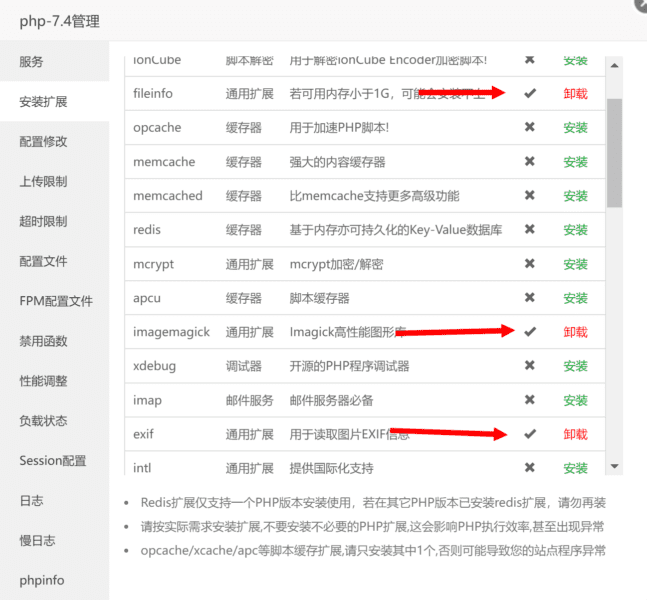
显示搜索结果后点击相应php版本,安装扩展,上面三个扩展组件安装即可解决。
WordPress添加说说微语
1、首先我们把以下代码,添加到主题根目录中的functions.php文件中。下面两步代码安装完成后,在后台页面,建立微语页面,在设置菜单,保存首页导航栏即可。纯代码微语添加微语,不影响百度谷歌搜录和数据备份恢复。
function register_suiyu_post_type() {
    $args = array(
        'labels' => array(
            'name'               => '碎语',              // 自定义文章类型的名称
            'singular_name'      => '碎语',              // 单数名称
            'add_new'            => '添加碎语',           // 新增按钮文案
            'add_new_item'       => '添加新碎语',         // 新增碎语文案
            'edit_item'          => '编辑碎语',           // 编辑碎语
            'new_item'           => '新碎语',             // 新碎语文案
            'view_item'          => '查看碎语',           // 查看碎语文案
            'search_items'       => '搜索碎语',           // 搜索碎语文案
            'not_found'          => '未找到碎语',         // 如果没有找到碎语
            'not_found_in_trash' => '回收站中没有碎语',   // 如果回收站没有碎语
            'menu_name'          => '碎语',              // 菜单名称
        ),
        'public'        => true,            // 是否公开可见
        'has_archive'   => true,            // 是否支持归档页面
        'show_in_rest'  => true,            // 启用Gutenberg编辑器
        'supports'      => array('title', 'editor', 'author', 'thumbnail', 'excerpt'), // 支持字段
        'rewrite'       => array(
            'slug'       => 'suiyu',         // 文章别名,设置成 'suiyu',
            'with_front' => false,           // 禁止前缀(例如首页)
            'feeds'      => true,            // 支持 RSS
            'pages'      => true,            // 支持分页
        ),
        'menu_position' => 5,               // 菜单中的位置
        'show_ui'       => true,            // 显示UI界面
        'show_in_menu'  => true,            // 在后台菜单中显示
        'taxonomies'    => array('category', 'post_tag'), // 关联分类和标签
        'has_archive'   => true,            // 是否启用归档
        'menu_icon'     => 'dashicons-format-status', // 菜单图标
    );
    register_post_type('suiyu', $args);
}
add_action('init', 'register_suiyu_post_type');
// 为「碎语」文章类型生成专属 RSS 源
add_action('init', 'suiyu_custom_rss_feed');
function suiyu_custom_rss_feed() {
    add_feed('suiyu', 'suiyu_rss_template');
}
2、然后添加模板文件,在模板主题根目录新建一个名为page-suiyu.php的文件,并将以下代码添加在其中
<?php

/**
 * Template Name: 碎语/说说
 */

get_header(); ?>
<?php
// 在wp_head中添加关键词和描述
add_action('wp_head', function() {
    // 添加关键词
    $keywords = '碎语札记, 生活, 记录, 日常感悟, 灵感, 碎片化, 每日灵感碎片';
    echo '<meta name="keywords" content="' . esc_attr($keywords) . '">';

    // 添加描述
    $description = '日常碎语札记,记录生活中的点滴感悟,分享摄影作品和那些转瞬即逝的灵感。不拘泥于形式,不追求完整,只言片语,碎片化生活记录。';
    echo '<meta name="description" content="' . esc_attr($description) . '">';
});
?>
<style>
/* 分页样式 */
.pagination {
    text-align: center;
    margin-top: 20px;
}

.pagination a, .pagination span {
    padding: 8px 16px;
    margin: 0 4px;
    background-color: #24a0f0;
    color: #fff;
    text-decoration: none;
    border-radius: 5px;
    transition: background-color 0.3s ease;
}

.pagination a:hover, .pagination span:hover {
    background-color: #7878f0;
}

/* 碎语列表项样式 */
.cbp_tmtimeline > li {
    margin-bottom: 20px;
    padding: 15px;
    background-color: #FFFFF9;
    border-left: 5px solid #E9E3C9;
    box-shadow: 0 2px 4px rgba(0, 0, 0, 0.1);
    border-radius: 8px;
    transition: all 0.3s ease;
    display: flex;
    align-items: center;
}

.cbp_tmtimeline > li:hover {
    transform: translateY(-5px);
    box-shadow: 0 6px 12px rgba(0, 0, 0, 0.15);
}

/* 去掉碎语内容的默认下划线 */
.cbp_tmtimeline .cbp_tmlabel {
    text-decoration: none !important;
    color: inherit !important;
    display: flex;
    flex-direction: column;
}

/* 确保 <p> 内文本不会受超链接影响 */
.cbp_tmtimeline .cbp_tmlabel p {
    text-decoration: none !important;
}

/* 调整发布日期的间距 */
.suiyu_time {
    font-size: 0.9em;
    color: #777;
    margin-top: 10px;
    margin-bottom: 5px;
}

/* 头像样式 */
.suiyu_author_img {
    margin-right: 15px;
}

.suiyu_author_img img {
    border: 1px solid #ddd;
    padding: 2px;
    float: left;
    border-radius: 64px;
    transition: all 1.0s;
    height: 50px;
}

.avatar {
    border-radius: 100% !important;
}

.zhuan {
    transform: rotateZ(720deg);
}

</style>

<div id="primary" class="content-area">
    <main id="main" class="site-main" role="main">
        <div class="cbp_suiyu">
            <?php
            $paged = (get_query_var('paged')) ? get_query_var('paged') : 1;

            $args = array(
                'post_type'      => 'suiyu',
                'post_status'    => 'publish',
                'posts_per_page' => 16,
                'paged'          => $paged,
            );

            $query = new WP_Query($args);

            if ($query->have_posts()) : ?>
                <ul class="cbp_tmtimeline">
                    <?php while ($query->have_posts()) : $query->the_post(); ?>
                        <li>
                            <span class="suiyu_author_img">
                                <img src="<?php echo esc_url(get_avatar_url(get_the_author_meta('ID'))); ?>" class="avatar avatar-48" width="48" height="48">
                            </span>
                            <!-- 这里修改,把 a 改成 div,去掉 href -->
                            <div class="cbp_tmlabel">
                                <p><?php the_content(); ?></p>
                                <p class="suiyu_time">
                                    <i class="fa fa-clock-o"></i> <?php echo get_the_time('Y年n月j日G:i'); ?><span class="page-views" style="margin-left: 10px; font-size: 14px; color: #666;">
        <?php
        if ( function_exists( 'pvc_get_post_views' ) ) {
            $page_views = pvc_get_post_views( get_the_ID() );
            echo '阅读: ' . $page_views;
        }
        ?>
    </span>
</p><?php
        if (function_exists('wp_ulike')) {
            echo do_shortcode('[wp_ulike for="post" style="wpulike-default"]');
        }
        ?>

                                </p>
                            </div>
                        </li>
                    <?php endwhile; ?>
                </ul>

                <!-- 分页 -->
                <div class="pagination">
                    <?php
                    echo paginate_links(array(
                        'total'   => $query->max_num_pages,
                        'current' => $paged,
                        'format'  => '?paged=%#%',
                        'prev_text' => __('« 上一页'),
                        'next_text' => __('下一页 »'),
                    ));
                    ?>
                </div>


                <?php wp_reset_postdata(); ?>
            <?php else : ?>
                <h3 style="text-align: center;">你还没有发表碎语噢!</h3>
                <p style="text-align: center;">赶快去发表你的第一条碎语心情吧!</p>
            <?php endif; ?>
        </div>
    </main>
</div>

<script type="text/javascript">
$(function() {
    var oldClass = "";
    var Obj = "";
    $(".cbp_tmtimeline li").hover(function() {
        Obj = $(this).children(".suiyu_author_img").children("img");
        oldClass = Obj.attr("class");
        var newClass = oldClass + " zhuan";
        Obj.attr("class", newClass);
    }, function() {
        Obj.attr("class", oldClass);
    });
});
</script>

<?php
get_footer();
?>
<!-- RSS 订阅链接 -->
<link rel="alternate" type="application/rss+xml" title="<?php bloginfo('name'); ?> 碎语订阅" href="<?php echo esc_url(home_url('/feed/suiyu')); ?>" />

    </a>
</div>
然后,建立页面微语菜单,并保存首页导航栏,即可写微语了。
3、archive-suiyu.php文件,可以设置固定拼音suiyi链接,没有我的设置不了,其它拼音可以。为啥这样,我不知道。
<?php
/**
 * The template for displaying single Suiyu post.
 */

get_header(); ?>

<style>
/* 在这里加入您的碎语美化样式 */
.cbp_tmtimeline > li {
    margin-bottom: 20px;
    padding: 15px;
    background-color: #FFFFF9;
    border-left: 5px solid #E9E3C9;
    box-shadow: 0 2px 4px rgba(0, 0, 0, 0.1);
    border-radius: 8px;
    transition: all 0.3s ease;
    display: flex;
    align-items: center;
}

.cbp_tmtimeline > li:hover {
    transform: translateY(-5px);
    box-shadow: 0 6px 12px rgba(0, 0, 0, 0.15);
}

.suiyu_time {
    font-size: 0.9em;
    color: #777;
    margin-top: 10px;
    margin-bottom: 5px;
}

.suiyu_author_img {
    margin-right: 15px;
}

.suiyu_author_img img {
    border: 1px solid #ddd;
    padding: 2px;
    float: left;
    border-radius: 64px;
    transition: all 1.0s;
    height: 50px;
}

</style>

<div id="primary" class="content-area">
    <main id="main" class="site-main" role="main">
        <div class="cbp_suiyu">
            <?php
            if (have_posts()) :
                while (have_posts()) : the_post(); ?>
                    <ul class="cbp_tmtimeline">
                        <li>
                            <span class="suiyu_author_img">
                                <img src="<?php echo esc_url(get_avatar_url(get_the_author_meta('ID'))); ?>" class="avatar avatar-48" width="48" height="48">
                            </span>
                            <div class="cbp_tmlabel">
                                <p><?php the_content(); ?></p>
                                <p class="suiyu_time">
                                    <i class="fa fa-clock-o"></i> <?php echo get_the_time('Y年n月j日G:i'); ?><span class="page-views" style="margin-left: 10px; font-size: 14px; color: #666;">
        <?php
        if ( function_exists( 'pvc_get_post_views' ) ) {
            $page_views = pvc_get_post_views( get_the_ID() );
            echo '浏览: ' . $page_views;
        }
        ?>
    </span>

</p><?php
        if (function_exists('wp_ulike')) {
            echo do_shortcode('[wp_ulike for="post" style="wpulike-default"]');
        }
        ?>
    </div>
</div>
                                </p>
                            </div>
                        </li>
                    </ul>
                <?php endwhile;
            else : ?>
                <p>未找到碎语内容。</p>
            <?php endif; ?>
        </div>
    </main>
</div>

<?php
get_footer();
?>
4、single-suiyu.php文件,可以加载碎语单独页面模板。
<?php
/**
 * The template for displaying single Suiyu post.
 */

get_header(); ?>
<?php
// 在wp_head中添加关键词和描述
add_action('wp_head', function() {
    // 添加关键词
    $keywords = '碎语札记, 生活, 记录, 日常感悟, 灵感, 碎片化, 每日灵感碎片';
    echo '<meta name="keywords" content="' . esc_attr($keywords) . '">';

    // 添加描述
    $description = '日常碎语札记,记录生活中的点滴感悟,分享摄影作品和那些转瞬即逝的灵感。不拘泥于形式,不追求完整,只言片语,碎片化生活记录。';
    echo '<meta name="description" content="' . esc_attr($description) . '">';
});
?>
<style>
/* 在这里加入您的碎语美化样式 */
.cbp_tmtimeline > li {
    margin-bottom: 20px;
    padding: 15px;
    background-color: #FFFFF9;
    border-left: 5px solid #E9E3C9;
    box-shadow: 0 2px 4px rgba(0, 0, 0, 0.1);
    border-radius: 8px;
    transition: all 0.3s ease;
    display: flex;
    align-items: center;
}

.cbp_tmtimeline > li:hover {
    transform: translateY(-5px);
    box-shadow: 0 6px 12px rgba(0, 0, 0, 0.15);
}

.suiyu_time {
    font-size: 0.9em;
    color: #777;
    margin-top: 10px;
    margin-bottom: 5px;
}

.suiyu_author_img {
    margin-right: 15px;
}

.suiyu_author_img img {
    border: 1px solid #ddd;
    padding: 2px;
    float: left;
    border-radius: 64px;
    transition: all 1.0s;
    height: 50px;
}

</style>

<div id="primary" class="content-area">
    <main id="main" class="site-main" role="main">
        <div class="cbp_suiyu">
            <?php
            if (have_posts()) :
                while (have_posts()) : the_post(); ?>
                    <ul class="cbp_tmtimeline">
                        <li>
                            <span class="suiyu_author_img">
                                <img src="<?php echo esc_url(get_avatar_url(get_the_author_meta('ID'))); ?>" class="avatar avatar-48" width="48" height="48">
                            </span>
                            <div class="cbp_tmlabel">
                                <p><?php the_content(); ?></p>
                                <p class="suiyu_time">
                                    <i class="fa fa-clock-o"></i> <?php echo get_the_time('Y年n月j日G:i'); ?><span class="page-views" style="margin-left: 10px; font-size: 14px; color: #666;">
        <?php
        if ( function_exists( 'pvc_get_post_views' ) ) {
            $page_views = pvc_get_post_views( get_the_ID() );
            echo '阅读: ' . $page_views;
        }
        ?>
    </span>

</p><?php
        if (function_exists('wp_ulike')) {
            echo do_shortcode('[wp_ulike for="post" style="wpulike-default"]');
        }
        ?>
    </div>
</div>
                                </p>
                            </div>
                        </li>
                    </ul>
                <?php endwhile;
            else : ?>
                <p>未找到碎语内容。</p>
            <?php endif; ?>
        </div>
    </main>
</div>

<?php
get_footer();
?>
重编2025,2月3号
碎语札记板块,标题添加“碎语|”代码,代码添加模板函数 functions.php文件尾部
// 在保存文章时,自动修改碎语札记文章的标题
function add_prefix_to_suiyu_title($post_id) {
    // 确保是保存文章时才进行处理,避免无限循环
    if (defined('DOING_AUTOSAVE') && DOING_AUTOSAVE) return $post_id;

    // 仅在碎语札记('suiyu')文章类型时修改标题
    if ('suiyu' == get_post_type($post_id)) {
        $post_title = get_post_field('post_title', $post_id);

        // 如果标题没有以“碎语|”开头,自动添加
        if (strpos($post_title, '碎语 | ') !== 0) {
            $new_title = '碎语 | ' . $post_title;
            // 更新文章标题
            wp_update_post(array(
                'ID' => $post_id,
                'post_title' => $new_title
            ));
        }
    }

    return $post_id;
}

// 添加钩子,当文章保存时调用此函数
add_action('save_post', 'add_prefix_to_suiyu_title');